How to Build a Scalable Design System in Drupal Projects

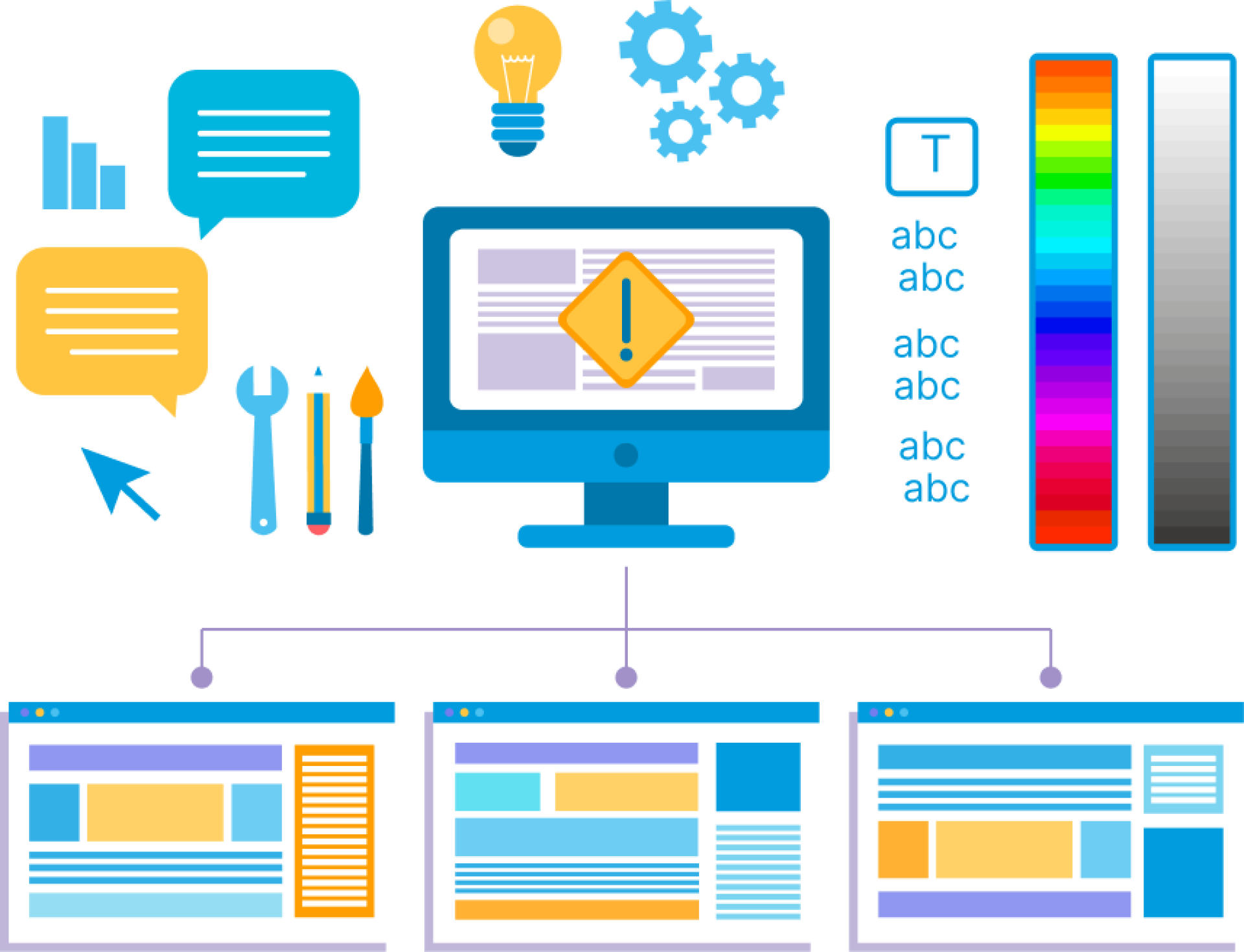
Large companies, such as Procter & Gamble, Unilever, and Volkswagen Group, typically manage hundreds of websites for multiple brands across various markets. They need to streamline their web development process, maintain brand consistency, and speed up product and design launches across multiple websites.
The design system (DS) helps to reuse components across websites and build pages with existing components. It saves time for content editors, ensures design consistency, and improves overall efficiency. Also, according to Figma, design systems can improve task completion speed by a third.
Why waste hours reinventing a button or layout that’s already been tested, approved, and styled, just once, for everyone?
What is a design system?
A design system is not just a set of buttons and fonts, but a structure that unites colors, typography, grids, animations, content, and ready-made components into a living ecosystem. It’s not limited to guides and styles — it’s a philosophy that sets the direction for all the work of designers and developers.
With the help of a design system, a brand gains integrity: every screen, every detail of the product works towards a single idea. You stop “reinventing the wheel” and get a ready-made tool that speeds up the team’s work and makes the result predictable and high-quality.
What does a modern design system include:
- Design tokens — unified values for color, font, indents, and animations.
- Style guides — the foundation: grid, typography, colour.
- Brand rules — clear definitions of how the product should behave, token values.
- Component library — ready-made interface elements for quick builds.
- Motion design — animations and motion tokens that make the product “live”.
- Content guide — best practices for text and communication.
- Documentation — a single source of truth for the entire team.
As a result, the design system becomes your competitive advantage, so the product develops faster, looks holistic, and users feel cared for in every detail.
Design tokens are the heart of a multi-brand design system
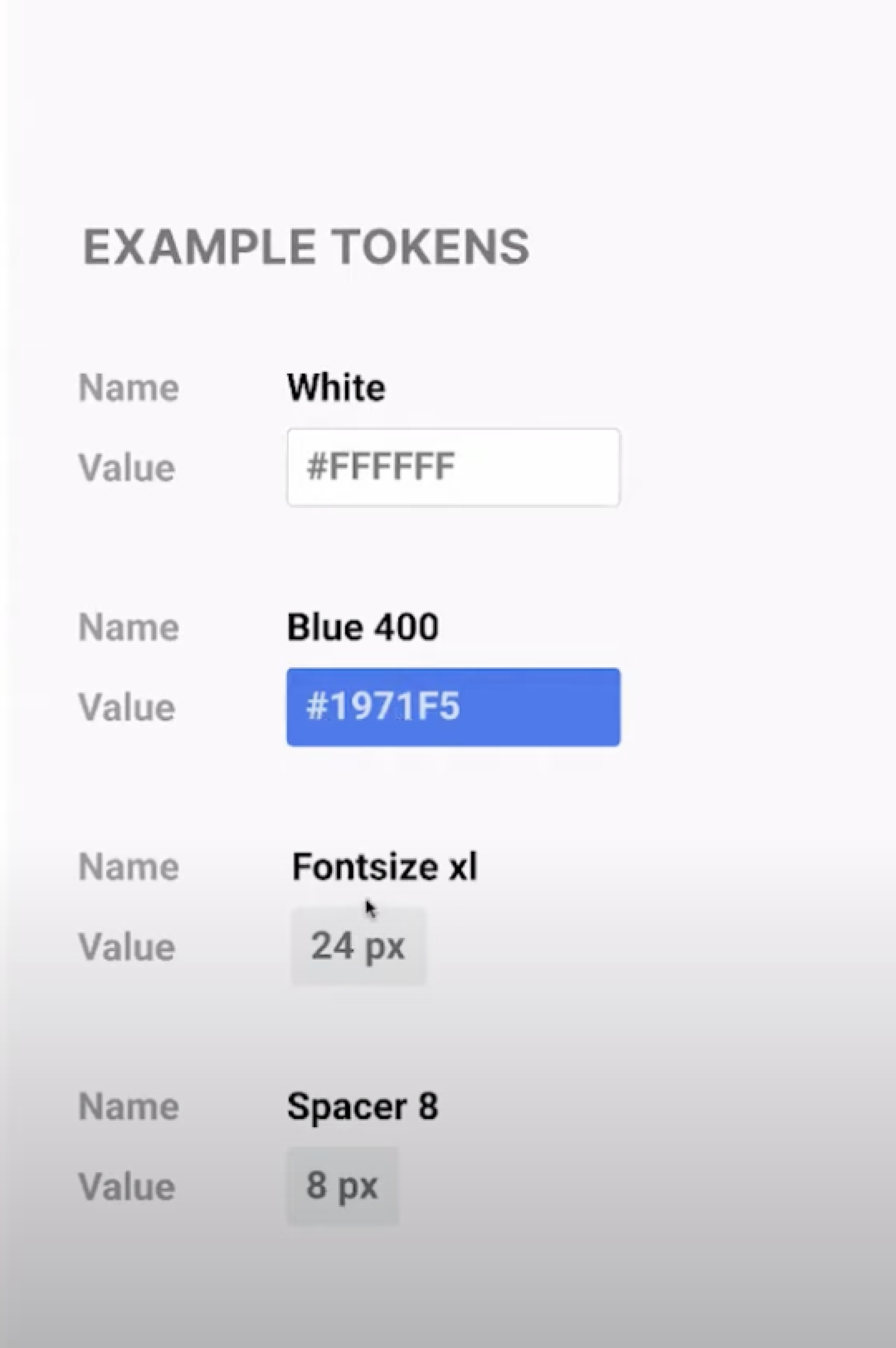
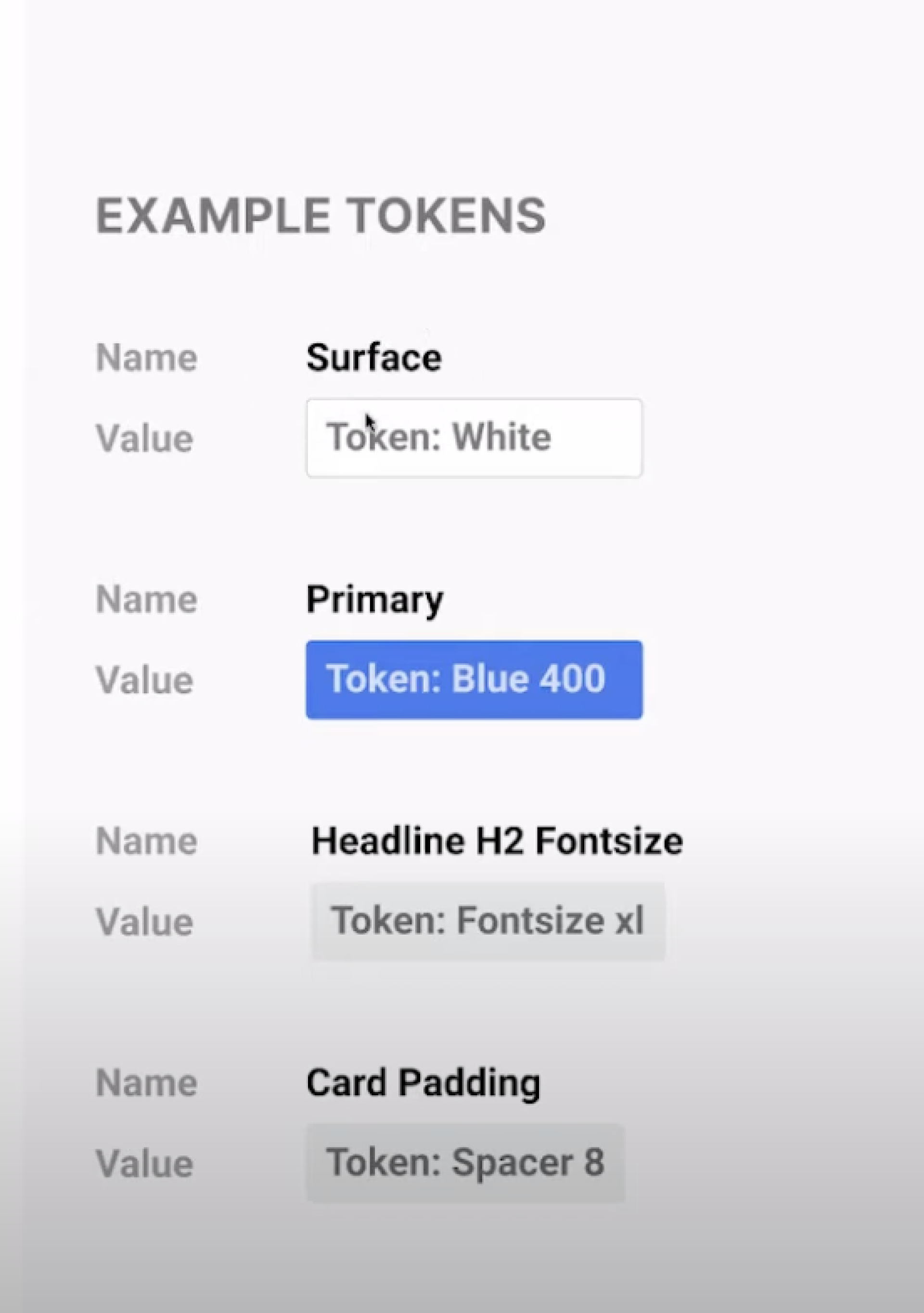
They turn abstract brand rules into living, reusable data: spacing, colors, typography, object styles, animations. These can include anything defined by design: a color as a HEX value, an opacity as a number, or an animation as an ease function. Everything that used to be stored in code and lost in chaos now becomes a single language for the entire team.
Even component names can be a token: btn-[variant]-[type]-[size]-[modifiers]. They’re used in place of hard-coded values in order to ensure flexibility and unity across all product experiences. One token changes — and the entire product updates automatically, preserving the integrity of the brand on any device and at any point of contact with the user.
Design tokens work like the DNA of your brand:
- Global tokens are basic primitives, universal and non-semantic — that is, not associated with a specific use case.
- Decision tokens apply choices to a specific context. They are semantic, describing how global values are used in buttons, forms, notifications, and other interface elements.
With tokens, you don’t just speed up design processes. You make them smarter: a unified language, predictable results, and freedom for product growth.
Ways to build a design system
Design system breaks everything down into small elements, and there are a few different ways to do this:
- Atomic approach: it all starts with “atoms” — basic buttons, inputs, icons. They are put together into “molecules”, “organisms”, and then into full-fledged pages and templates.
- Functional and visual patterns: one part of the system is responsible for work (components), the other for perception (color, typography).
- Foundations, components, widgets, templates: structuring by maturity levels of elements.
There is no right or wrong approach to design system development. Each team chooses the method that is more suitable and understandable to them. At Attico, we employ an atomic approach because it enables our team to easily understand the hierarchy and relationships between elements, and quickly find or reuse components during design and development.
Multibrand design system approaches
When you need to work with several brands at once, the question arises: how to organize the system so that it is both flexible and convenient?
One of the most common options is for the first brand to serve as the master design system. All other brands inherit its rules and add their own exceptions and definitions on the brand level.
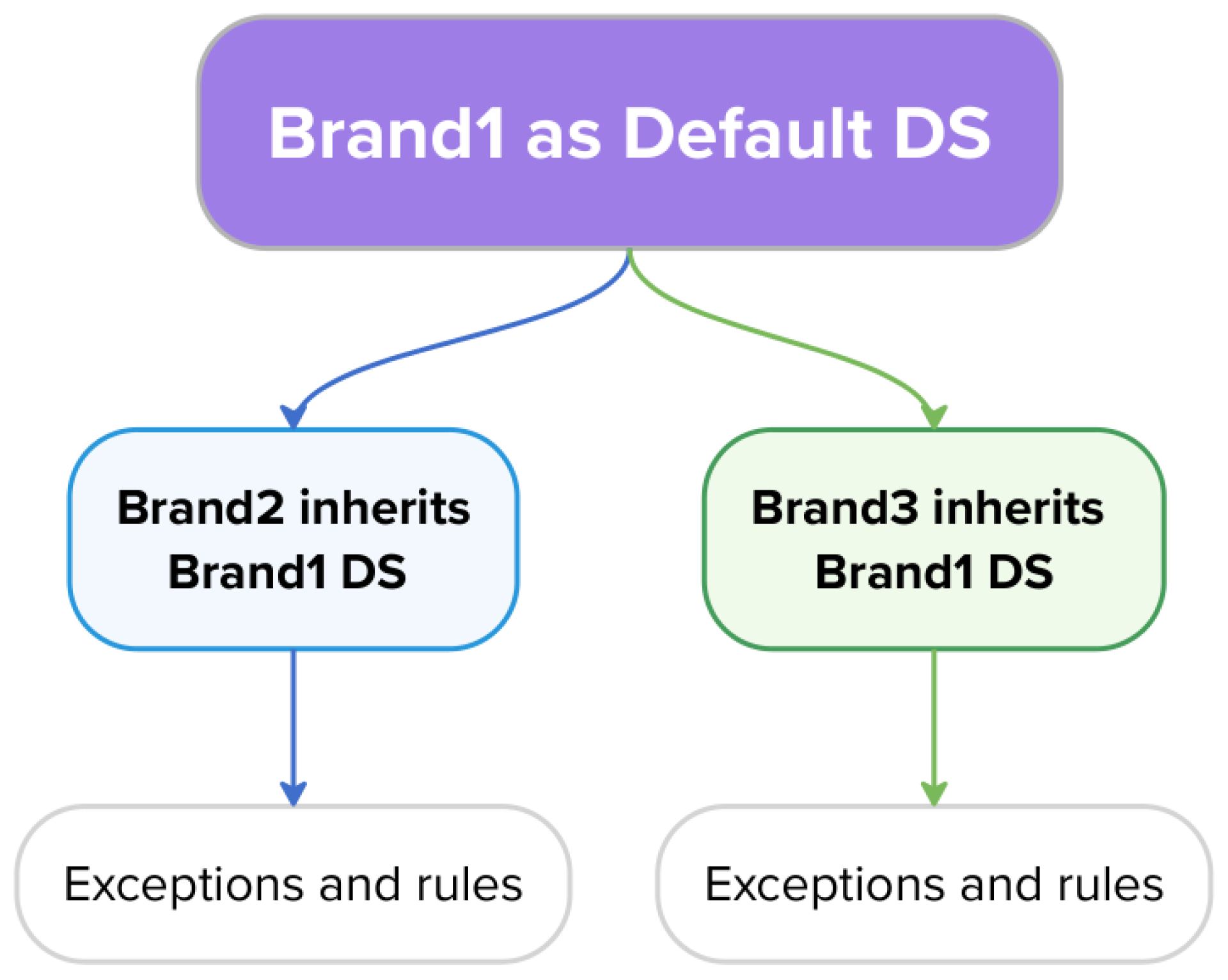
This approach has obvious pros: it is moderately customizable and allows you to move forward faster, because most of the foundation is already in place.
The cons are that Brand1 may not cover all brand needs, because all rules can be valid only for this brand. In addition, manual effort is required to set up each theme file, and each theme would need to be published as individual libraries.
The second brand is a master design system with unstyled elements. It contains only a structure, a list of elements, and a token system, without styles.
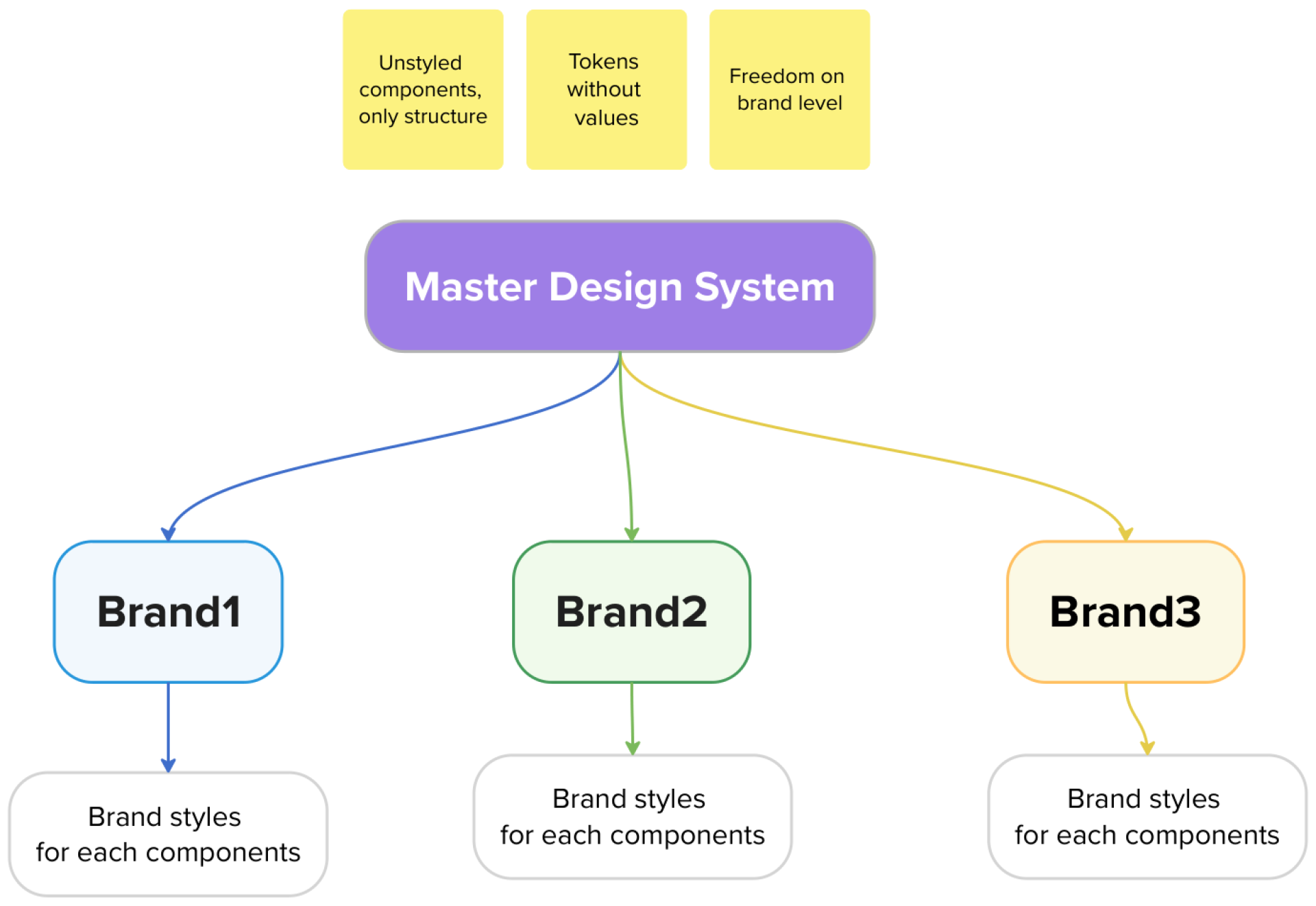
It also has its pros and cons. The main advantage of this approach is high customization: each brand can completely design the elements for itself. You can edit almost everything related to the appearance and behavior of the interface: from components and typography to grids and tokens.
However, there are also disadvantages: there is no single source of truth, development and maintenance require a significant amount of manual effort, and scaling such a system is not straightforward. Additionally, each theme file must be configured manually. That's right, there are two sides to every coin.
The third brand is a master design system that already includes all components and their variants, basic styles, and tokens. By default, brands utilise all styles from the Master level; however, if necessary, any token can be overridden at the level of a specific brand.
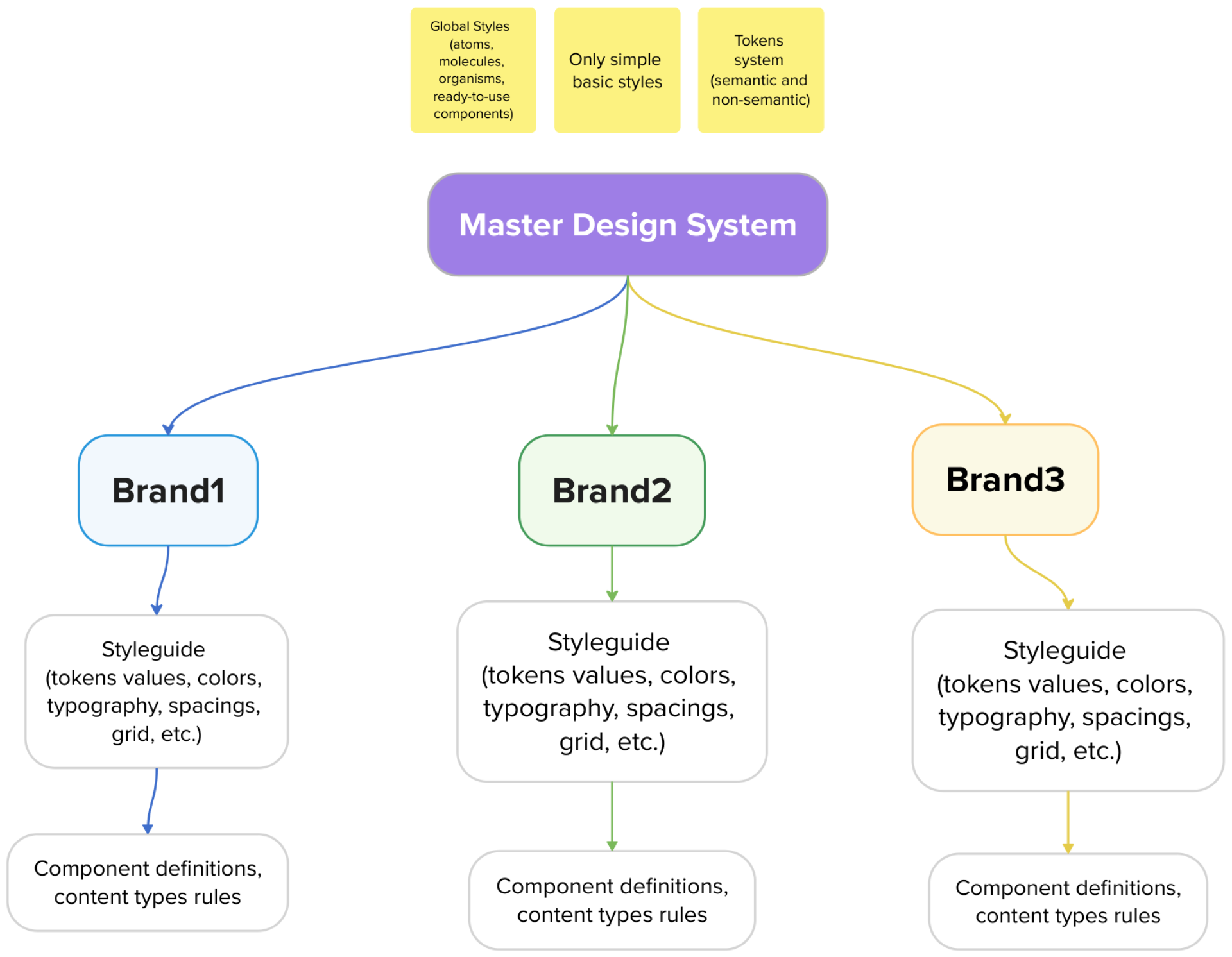
At Attico, we prefer the third approach. It is highly customizable, easy to update, and scalable, with a single source of truth. There is no design effort at the brand level, but manual effort is still required to create mockups for each brand.
Tip from the expert: Decision drivers are the starting point. Just think about who is using the design system — client, editors, design team, developers? When you answer this question, you will understand what tools and rules you need to use for your design system.
Design system implementation steps
Implementing a design system is not a fashion trend, but a way to bring order to a company’s digital products. No more “winging it”, no more identical buttons that are drawn anew each time. Developers, designers, and editors begin to speak the same language — and work becomes easier and faster.
And how to make the process as clear and easy as possible? Below is our step-by-step plan that helps implement a design system without the headache, just results.
- Analyzing and planning:
- Identify brand requirements, audiences (B2B, B2C), functionality, and scope of work for all platforms.
- Check all existing components and interfaces on each platform.
- Identify common elements that can be standardized and unique features that should be used as separate components.
- Create content architecture with a user journey map for all brands to identify key interaction points that require harmonization.
- Design the overall architecture of the design system:
- Define a core set of components for a master design system.
- Develop a token system for a master design system (colors, fonts, indents) to allow flexibility in styling.
- Work on brand style guides and definitions.
- Technology and tool selection:
- Identify tools for building and publishing components.
- Answer the following questions: Do you need a Storybook? Who will use it? Do you need automated testing?
- Creating components and style library:
- Start by developing basic components (buttons, forms, cards, etc.).
- Create styles and branded versions using a token system.
- Platform integration and refactoring:
- Migrate platforms to the new system of components and styles, update backend (BE) logic.
- Refactor the code of each platform to use a common structure and reduce duplication.
- Create documentation and training:
- Prepare documentation that includes guidelines on how to use and update components.
- Provide training for designers and developers to use components and contribute to the system.
- Identify those responsible for maintaining and updating the design system.
- Testing, feedback gathering, and improvement:
- Conduct testing and pilot implementation phases on one of the platforms to see potential issues.
- Collect feedback from teams and users and make adjustments to the system. Feedback is really important, and yes, it can be painful.
- Summarise the results: evaluate cost reductions, efficiency gains, and improved user experience.
Technologies and approaches that we use
A good design system is not only about visual solutions, but also about the technologies that everything rests on. They determine how convenient it is for the team to work with components, make edits, and scale projects. At Attico, we chose a clear and stable stack: it helps us launch websites faster, maintain order, and avoid complications. Below is a brief overview of each tool.
Figma
If you’re building a design system, Figma just makes sense. It’s made for teams that want to keep things consistent, scalable, and fast, without drowning in outdated docs or never-ending handoffs.
You can create components, set up variants, and use variables to manage different themes, brands, or platforms — all in one place. No messy duplicates, no extra versions floating around.
Everyone works together in real time — designers, developers, and product managers. Update a component once, and every design using it reflects the change. No need for extra tools or endless back-and-forth.
Plus, there’s version control, plugin support, and easy dev integrations. It’s not just a design tool — it’s the hub for your entire system.
Drupal
For the backend, there is no debate — Attico goes with Drupal. It’s the core of our infrastructure, and we’ve worked with it long enough to know how to make the most of it.
Drupal gives Attico’s team the flexibility to manage complex content models and power multiple sites under one system. Out of the box, Drupal doesn’t come with a component-based approach, but it allows the modules to integrate one. With the right setup, our team can connect its component-driven workflow directly into Drupal, making it easy to keep everything structured and consistent across brands.
As part of the design system setup, we use Drupal not just for content management, but also to connect the frontend with reusable components. That way, editors can build pages using the same elements the design and dev teams work with — no copy-paste, no visual chaos.
Tailwind
Attico decided to use Tailwind — it turned out to be the closest to our tasks.
Why Tailwind? First of all, it allows users to style the application through utility classes. Each utility class applies a design token: a key-value pair representing a design specification. Moreover, design tokens are easy to integrate into Tailwind, and it turns out to be as natural as possible.
You can override or extend classes — that is, implement your own token system and change values at the brand level. Also, updating and scaling are easy. Another important point is that the token names can match those in Figma, so there is no confusion. And last, but not least, in the future, you can automate processes even more.
But as we are using Drupal as a backend and we don’t use headless or component-based architecture yet. It’s about Single Directory Components in Drupal, not the React approach in general. Our team is not using Tailwind classes directly in HTML; it’s using it with the @apply function and using a separate build for each CSS file.
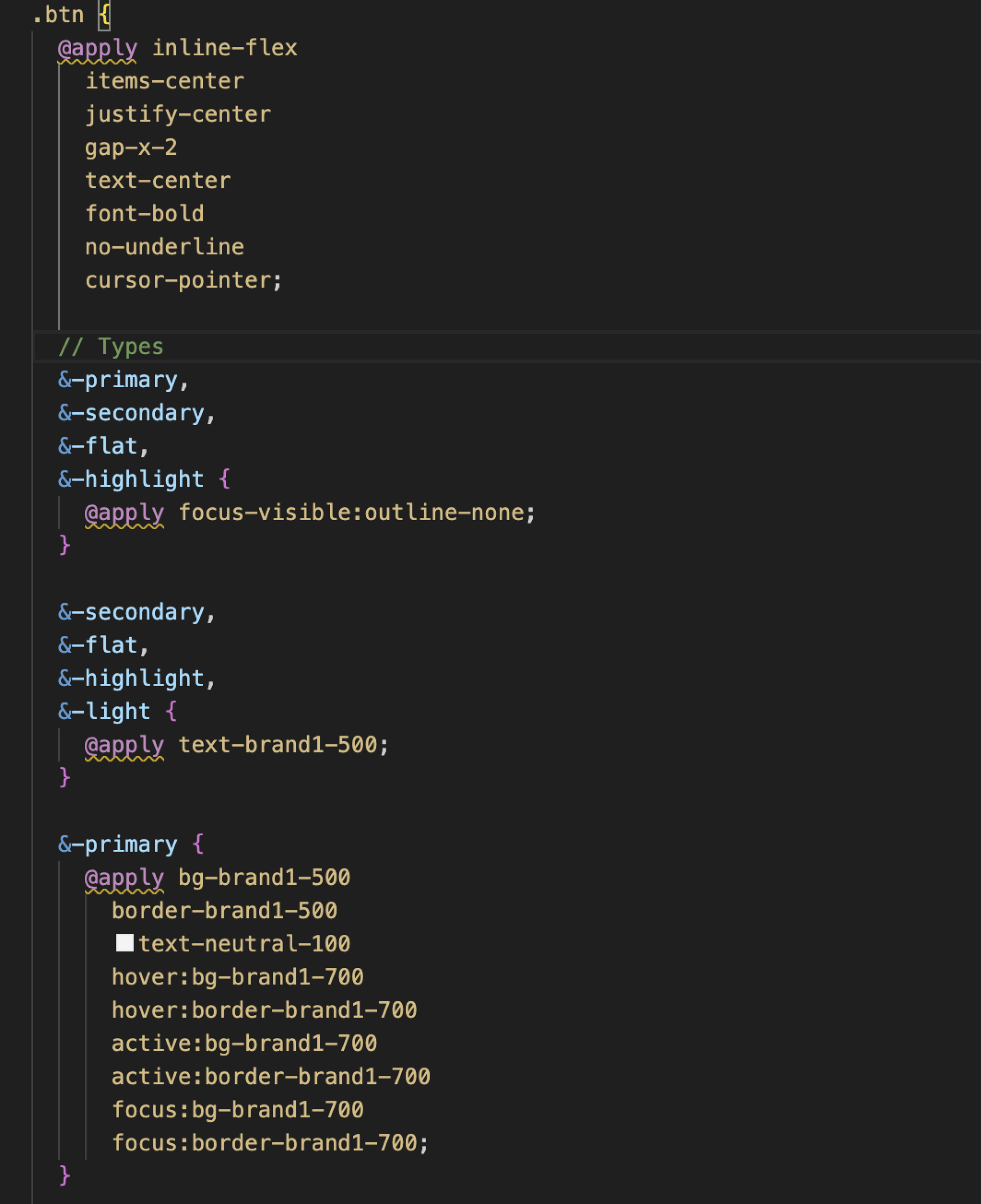
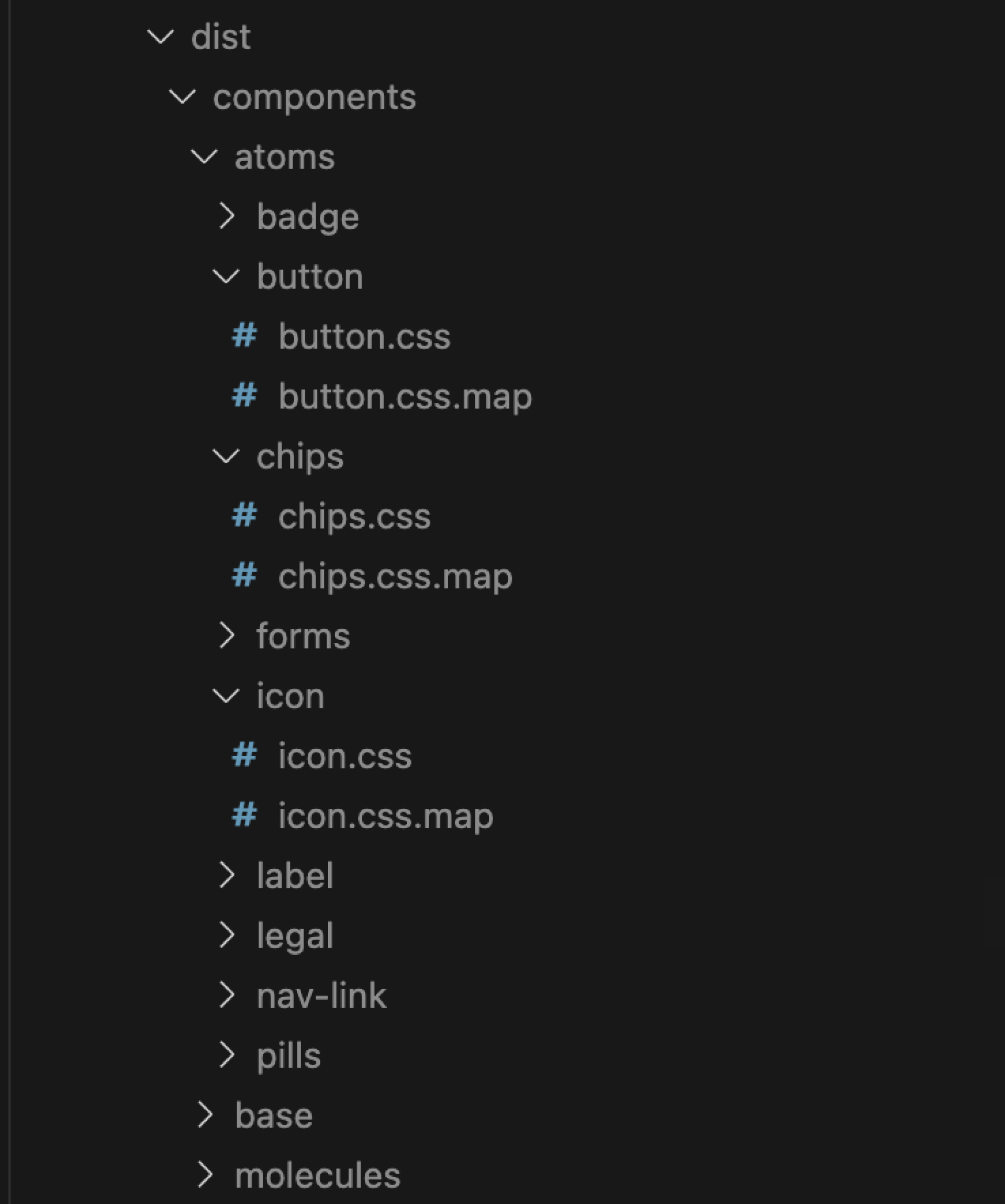
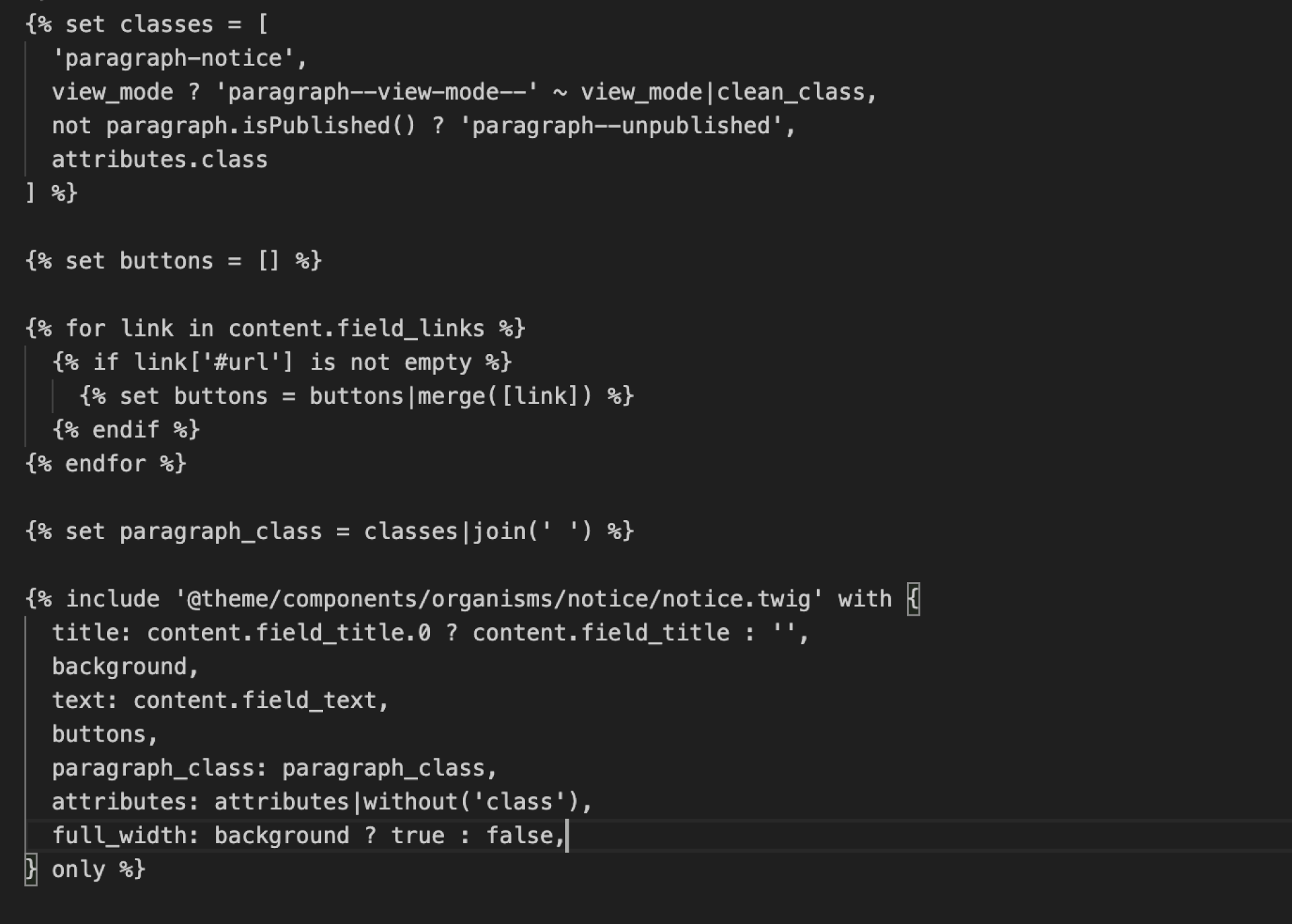
If the component is not present on the page, Attico doesn’t load its styles or JS. On Drupal, we include our frontend template:
In our design system, everything is built on simple and clear rules — they are like road signs and help us move faster and without traffic jams:
- No jQuery: it is outdated and only slows down the process.
- Each component “lives” in its own CSS file — it is so easy to maintain order and immediately find what is needed.
- Repeated styles are used like utilities — they help when the backend can’t add a class on their side, and it’s needed to manipulate with structure
.class > a. As a result, the structure can be managed conveniently, without wasting time on clunky workarounds. - Colors are stored as variables, that is, global tokens are a single source of truth for the entire system.
- Decision tokens help change specific solutions for each brand without pain and unnecessary dependencies.
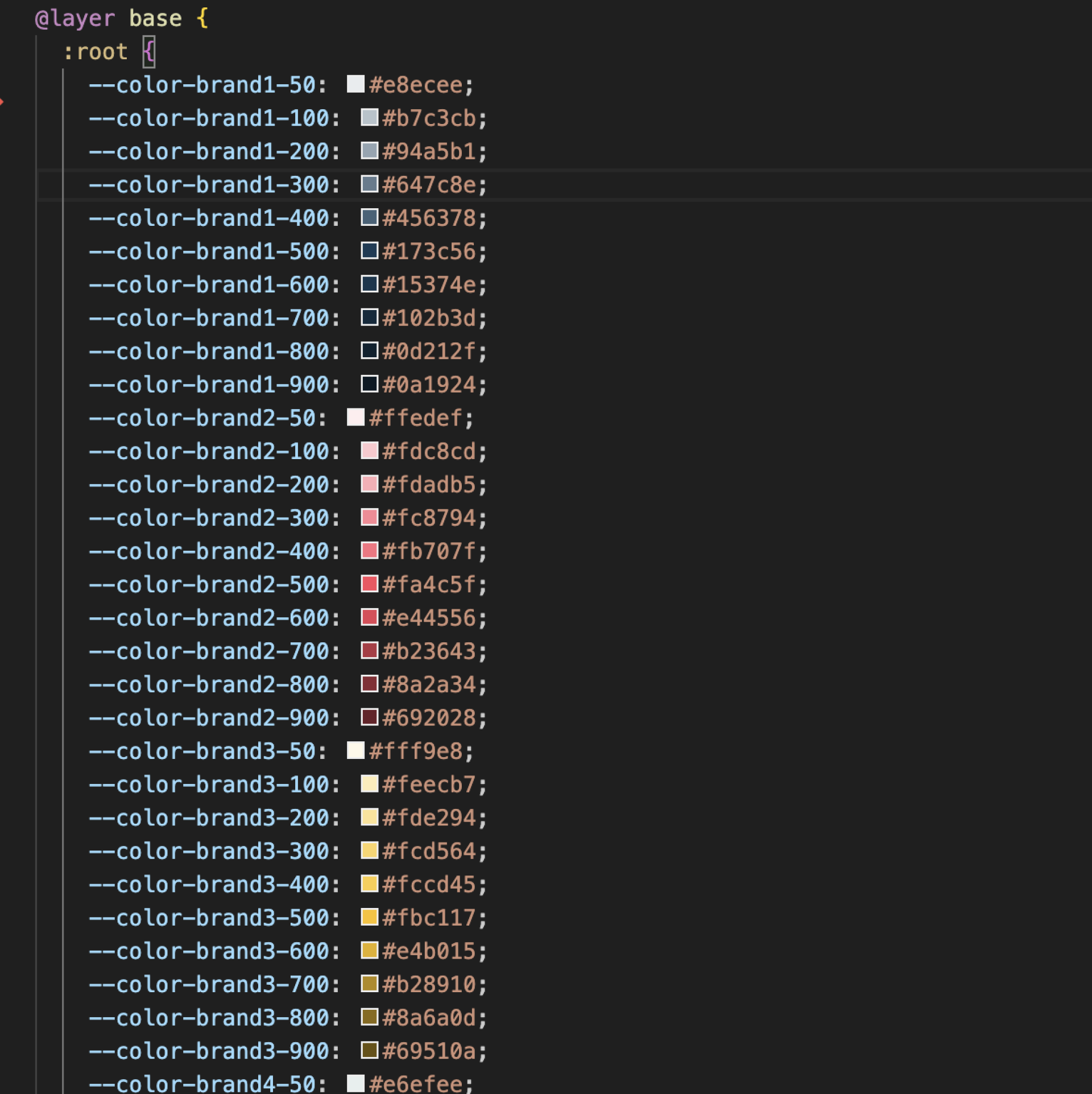
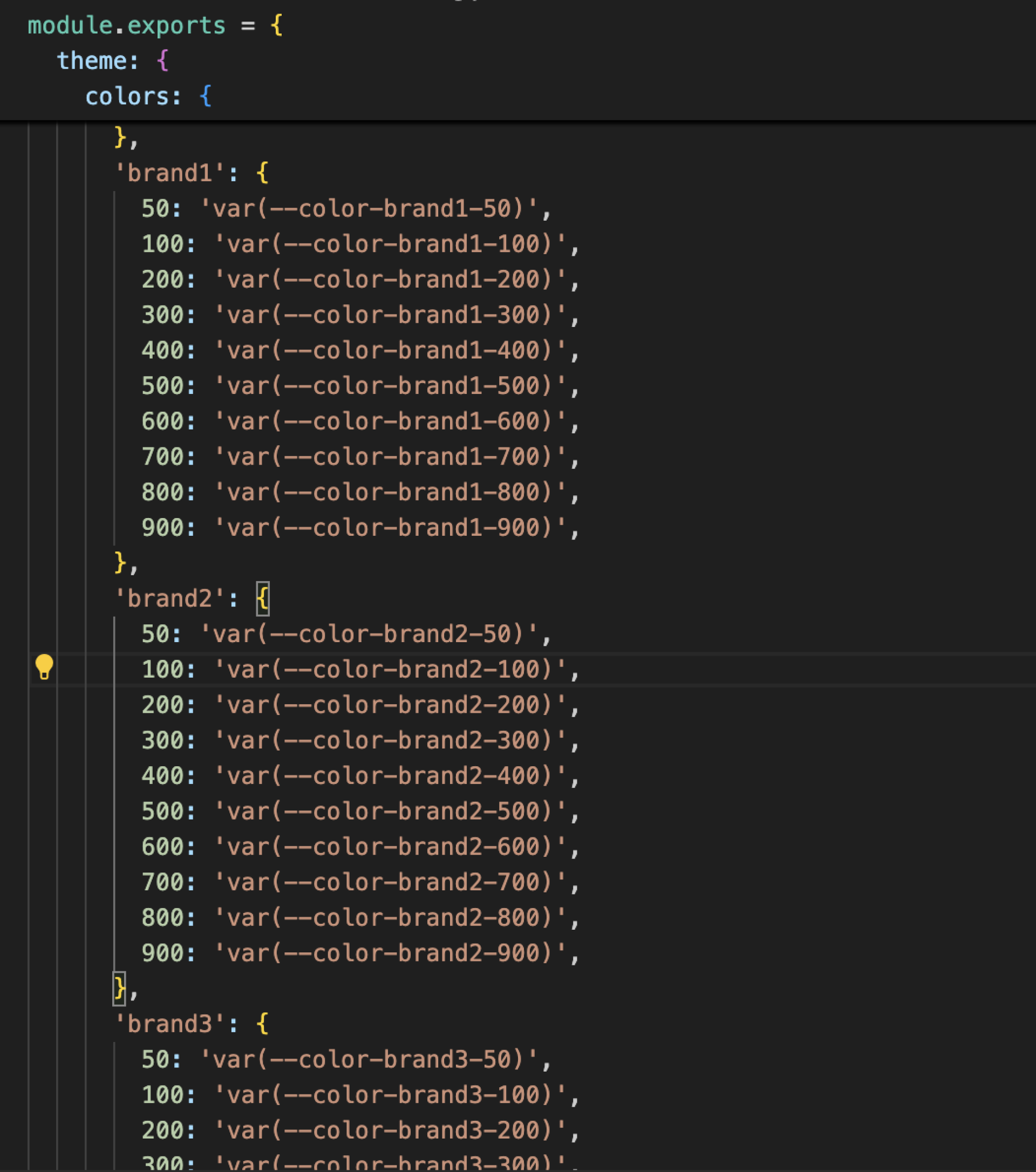
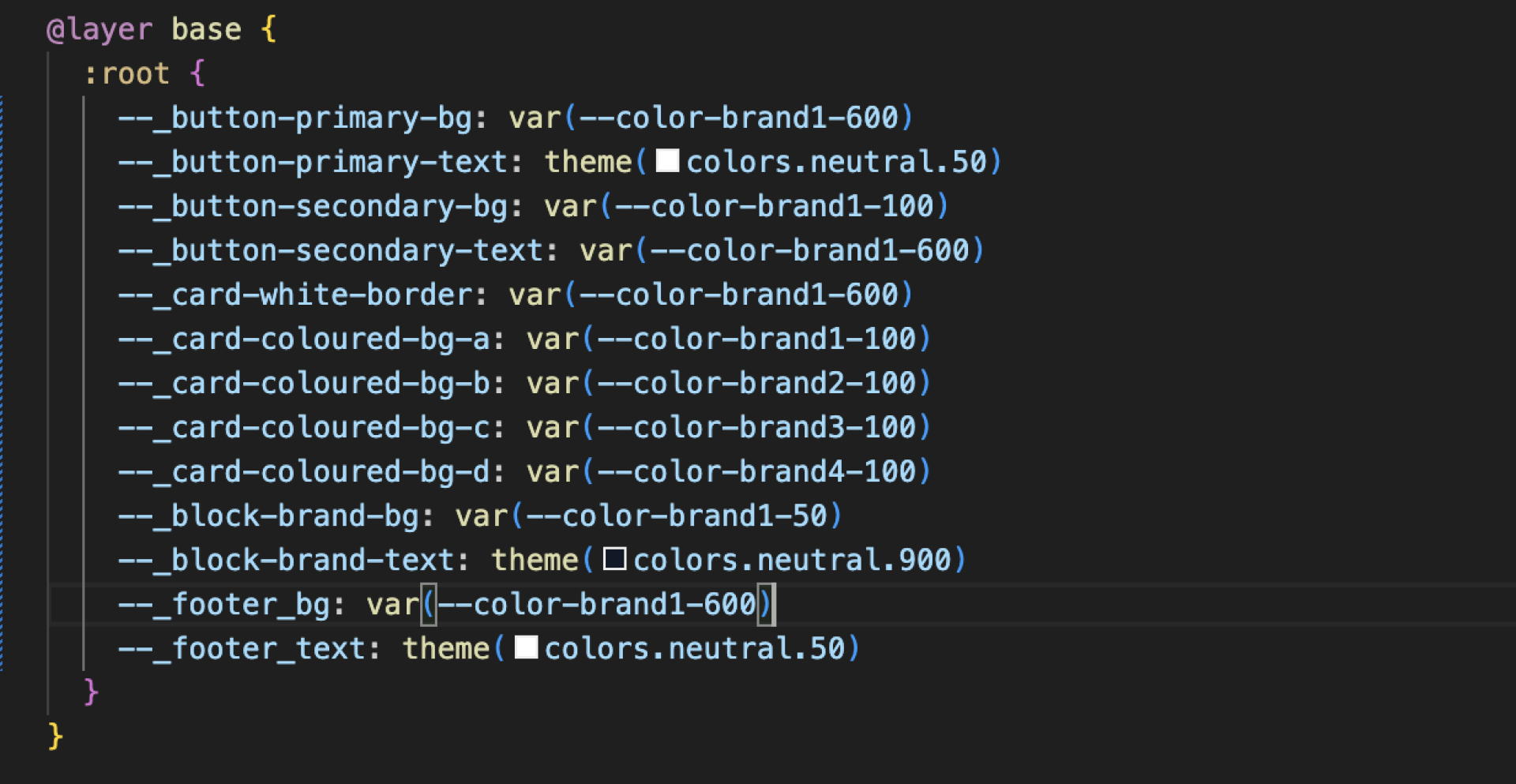
For decision tokens, Attico is also using variables on the root level. Naming is the same as we have in Figma variables, and we use _ in the name to understand that this is a context variable. They can also be used at the brand level, but in this case, you will have to create files per component on the brand level and override them.
CSS variables on 10,000 elements are 0.7% slower than raw CSS.
Storybook
Storybook is not just an additional tool, but a working environment that can be used to document and test the components of your design system. It allows you to test all components in isolation and forms a clear component library on the same code base as Drupal. This makes it easy to share hard-to-reach states and edge cases without needing to run your whole app.
Challenges and difficulties
The biggest challenge was finding the balance between consistency and flexibility. Usually, there is something in between.
Attico needed to align with the expectations of brand managers while also meeting the requirements of designers and developers. At the same time, we wanted each brand to be able to maintain its unique style while using the same code.
It was a long process: discussions, finding solutions, and choosing the best options to ensure everyone is comfortable. Our team held many presentations to markets, analyzed data, explained why certain blocks needed to be removed, and why users didn’t use them.
Results and what we achieved
When everything is collected in one system, it becomes easier and faster to work. Below is a brief description of what we managed to do and what changes it brought: from saving time to convenience for editors and users.
Component library creation
Instead of recreating components and layouts on each platform, we built a shared component library. This allowed us to create reusable paragraphs and components that could be applied consistently across all sites. No more duplicating efforts — everything was streamlined under one library.
Standardizing user journeys
With a unified design system, we created consistent user experiences across all brands. Now, users have a seamless journey no matter which brand’s site they are on, improving satisfaction and retention.
Reducing time-to-market
By consolidating platforms, we reduced the time needed for new feature development and fixes on the frontend by half. With a clear component library, building pages is easy, without unnecessary design. We have CI/CD pipelines, one general build for all themes, and a clear token system.
Lowering total ownership cost
Maintenance, updates, and troubleshooting were simplified, and the total cost of ownership decreased. The system became much more efficient to manage, scaling smoothly as the company grew.
Conclusion
This is how we implemented a design system within the default Drupal approach — without headless, just with Twig templates, a regular theme, and tokens. This method works stably: everything is under control, components are easy to maintain, and websites of different brands look like one family.
But things changed in 2024, when Single Directory Components (SDC) were added to the Drupal core. This was a real breakthrough for the frontend: components can now be assembled and reused directly inside Drupal, without unnecessary magic and workarounds.
DrupalCon Vienna session
Interested to learn more about implementing a multibrand design system on Drupal? Join the session at DrupalCon Vienna 2025, where Olga Tsiamliak will co-present with Bastien Chanot from Nestlé to demonstrate how a single system can adapt to different brand identities and how leveraging design tokens to automate updates streamlines the process — reducing manual effort, accelerating rollouts, cutting costs, and shortening the path from idea to launch.
 Volha TsimaliakVolha is a frontend developer and team lead at Attico with over 10 years of experience. She is passionate about new frameworks and design systems.
Image Attribution Disclaimer: At The Drop Times (TDT), we are committed to properly crediting photographers whose images appear in our content. Many of the images we use come from event organizers, interviewees, or publicly shared galleries under CC BY-SA licenses. However, some images may come from personal collections where metadata is lost, making proper attribution challenging.
Our purpose in using these images is to highlight Drupal, its events, and its contributors—not for commercial gain. If you recognize an image on our platform that is uncredited or incorrectly attributed, we encourage you to reach out to us at #thedroptimes channel on Drupal Slack.
We value the work of visual storytellers and appreciate your help in ensuring fair attribution. Thank you for supporting open-source collaboration!

ASK: Drupal Community Needs Your Support
View all →
Note: The vision of this web portal is to help promote news and stories around the Drupal community and promote and celebrate the people and organizations in the community. We strive to create and distribute our content based on these content policy. If you see any omission/variation on this please reach out to us at #thedroptimes channel on Drupal Slack and we will try to address the issue as best we can.

Related Event Sessions

Related Organizations

Related People


You may also like