Drupal Service Container Deep Dive (Part 1): Tags, Compiler Passes, Service Providers and Autoconfiguration


The evolution of Drupal core has increasingly embraced modern PHP standards and robust object-oriented programming (OOP) principles, driven largely by its integration of Symfony components. Central to this modernization is the Service Container, which acts as the core registry responsible for service instantiation, dependency resolution, and lifecycle management.
This article was originally published on the SparkFabrik engineering blog and is republished here with permission.
A service is a reusable, stateless object designed to perform a single, well-defined task, such as ConfigFactory for configuration access or EntityTypeManager for entity access.
The philosophy underpinning service usage is the promotion of loose coupling and adherence to the Dependency Inversion Principle (DIP). A class should request services from the container rather than instantiating them directly with new.
In this series, we explore the Drupal service container in depth:
- Part 1 — service tags, compiler passes, service providers, and autoconfiguration
- Part 2 — aliases, autowiring, and named arguments
- Part 3 — service collectors
- Part 4 — factories
- Part 5 — backend overrides
- Part 6 — service decoration and lazy loading
Anatomy of a Drupal service
A Drupal service is defined within a module’s MODULE.services.yml file:
# modules/contrib/webprofiler/webprofiler.services.yml
services:
  webprofiler.matcher.exclude_path:
    class: Drupal\webprofiler\RequestMatcher\WebprofilerRequestMatcher
    arguments: ['@path.matcher', '@config.factory', 'exclude_paths']
# core/core.services.yml
services:
  path.matcher:
    class: Drupal\Core\Path\PathMatcher
    arguments: ['@config.factory', '@current_route_match']
  config.factory:
    class: Drupal\Core\Config\ConfigFactory
  current_route_match:
    class: Drupal\Core\Routing\CurrentRouteMatch
    arguments: ['@request_stack']
  request_stack:
    class: Symfony\Component\HttpFoundation\RequestStack
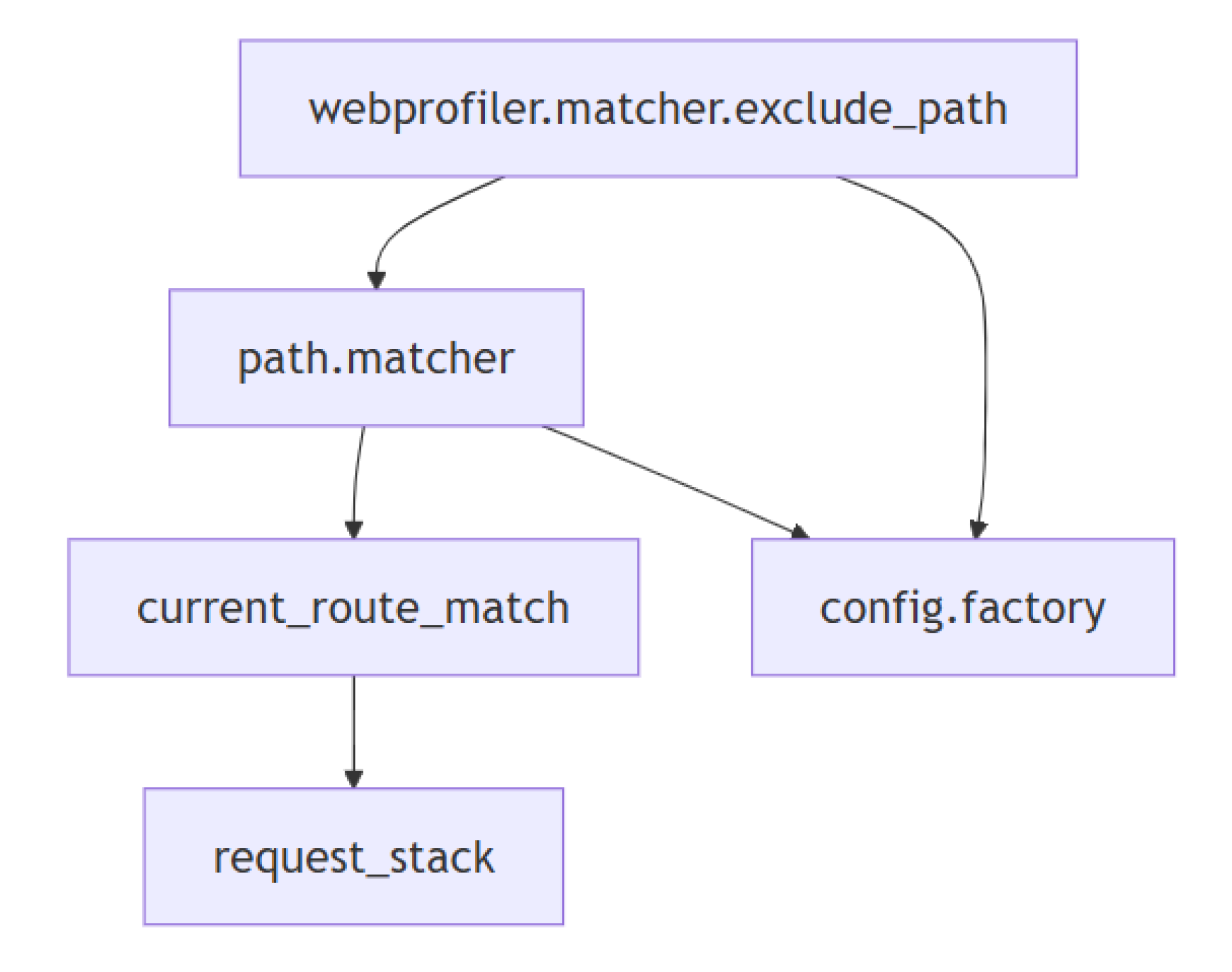
When code requests the webprofiler.matcher.exclude_path service, the container resolves its dependencies and instantiates the class:
namespace Drupal\webprofiler\RequestMatcher;
use Drupal\Core\Config\ConfigFactoryInterface;
use Drupal\Core\Path\PathMatcherInterface;
use Symfony\Component\HttpFoundation\RequestMatcherInterface;
class WebprofilerRequestMatcher implements RequestMatcherInterface {
  public function __construct(
    private readonly PathMatcherInterface $pathMatcher,
    private readonly ConfigFactoryInterface $configFactory,
    private readonly string $configuration,
  ) {}
}
The resolution graph looks like this:
The service container supports injecting scalar values:
@— service reference%— parameter reference@?— optional service reference- No prefix — literal value
parameters:
  param1: 'some string'
services:
  some_service1:
    class: Some\Class\Name1
  some_service2:
    class: Some\Class\Name2
        arguments: ['@some_service1', '%param1%', 42, true, 'another string', '@?some_service3']
namespace Some\Class;
class Name2 {
public function __construct(
private readonly Name1 $someService1,
private readonly string $param1,
private readonly int $param2,
private readonly bool $param3,
private readonly string $param4,
private readonly ?Name3 $someService3 = null,
) {}
}Differences between Drupal and Symfony service containers
Drupal builds on Symfony’s container but adapts it for YAML-driven definitions and performance considerations aligned with its modular architecture.
Service Tags
services:
  webprofiler.database:
    class: Drupal\webprofiler\DataCollector\DatabaseDataCollector
    arguments: ['@database', '@config.factory']
    tags:
      - {
          name: data_collector,
          template: '@webprofiler/Collector/database.html.twig',
          id: 'database',
          label: 'Database',
          priority: 750
        }
Compiler Passes
namespace Drupal\webprofiler\Compiler;
use Symfony\Component\DependencyInjection\Compiler\CompilerPassInterface;
use Symfony\Component\DependencyInjection\ContainerBuilder;
final class ProfilerPass implements CompilerPassInterface {
  public function process(ContainerBuilder $container): void {
    foreach ($container->findTaggedServiceIds('data_collector', true) as $id => $attributes) {
      // ...
    }
  }
}
Service Providers
namespace Drupal\webprofiler;
use Drupal\Core\DependencyInjection\ContainerBuilder;
use Drupal\Core\DependencyInjection\ServiceProviderBase;
class WebprofilerServiceProvider extends ServiceProviderBase {
  public function register(ContainerBuilder $container): void {
    $container->addCompilerPass(new ProfilerPass());
  }
    }
$container->addCompilerPass(
pass: new ProfilerPass(),
type: PassConfig::TYPE_BEFORE_OPTIMIZATION,
priority: 10
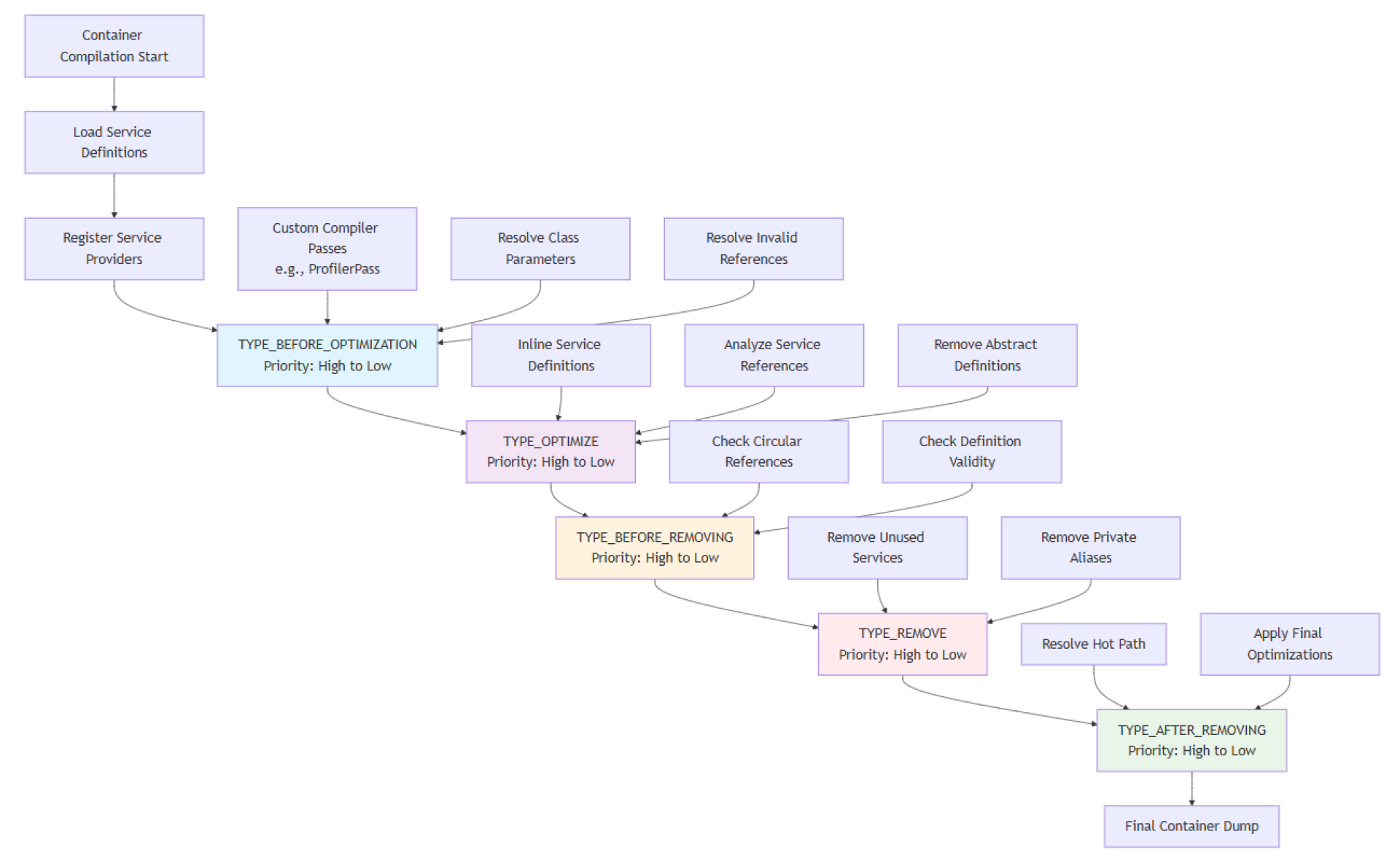
);This diagram illustrates when compiler passes run:
Autoconfiguration
namespace Drupal\Core;
class CoreServiceProvider implements ServiceProviderInterface, ServiceModifierInterface {
  public function register(ContainerBuilder $container): void {
    $container
      ->registerForAutoconfiguration(EventSubscriberInterface::class)
      ->addTag('event_subscriber');
  }
}
Autoconfiguration only works with tags that have no attributes.
In the next part, we’ll explore aliases, autowiring, and named arguments.
This content is cross-posted from the SparkFabrik engineering blog .
 Luca LussoDrupal, Symfony and Go developer. Maintainer of the Drupal WebProfiler and Monolog modules. Scout leader and father of two.
Image Attribution Disclaimer: At The Drop Times (TDT), we are committed to properly crediting photographers whose images appear in our content. Many of the images we use come from event organizers, interviewees, or publicly shared galleries under CC BY-SA licenses. However, some images may come from personal collections where metadata is lost, making proper attribution challenging.
Our purpose in using these images is to highlight Drupal, its events, and its contributors—not for commercial gain. If you recognize an image on our platform that is uncredited or incorrectly attributed, we encourage you to reach out to us at #thedroptimes channel on Drupal Slack.
We value the work of visual storytellers and appreciate your help in ensuring fair attribution. Thank you for supporting open-source collaboration!


ASK: Drupal Community Needs Your Support
View all →
Note: The vision of this web portal is to help promote news and stories around the Drupal community and promote and celebrate the people and organizations in the community. We strive to create and distribute our content based on these content policy. If you see any omission/variation on this please reach out to us at #thedroptimes channel on Drupal Slack and we will try to address the issue as best we can.

Related Organizations

Related People


You may also like