How to Create Before/After Sliders in Drupal with Image Compare Accessible Slider

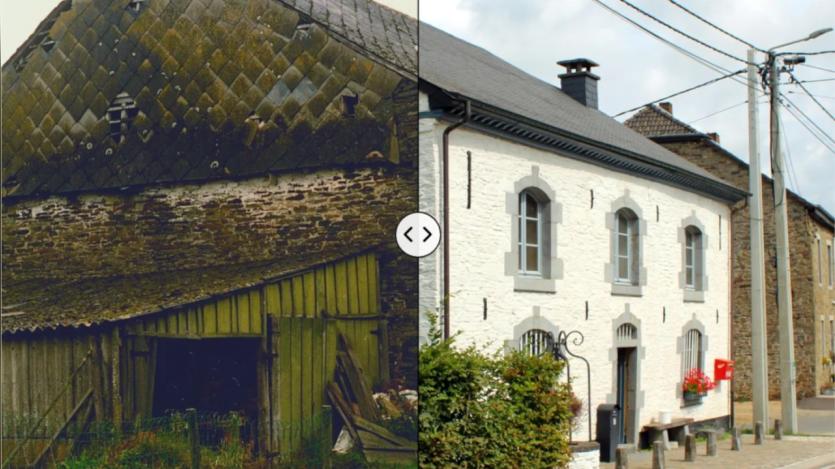
Gilles Bailleux highlights the Image Compare Accessible Slider module by Frank Mably, developed for Bordeaux Métropole, and its role in showcasing the 14-year restoration and inauguration of Blanche Maison in the Belgian Ardennes. The module enables a draggable before/after slider that works seamlessly with Drupal’s core responsive_image module, ensuring accessibility and compatibility across all devices without console errors.
The slider is implemented as a field formatter, allowing content creators to upload two images for comparison. Its design supports alt and title attributes for accessibility and integrates structured data via a custom CreativeWork schema. Each image is represented as an ImageObject, validated through Google’s image license metadata requirements. This boosts SEO by surfacing Creative Commons–licensed images in Google Images, demonstrated with before and after restoration photos of Blanche Maison.
The Blanche Maison event page further applied the Event schema, enabling AI tools like Gemini, ChatGPT, Copilot, and Grok to retrieve accurate details about the museum inauguration. This illustrates the module’s GEO and SEO potential, especially when combined with modules like Schema.org Metatag.
Accessible, performant, and easy to configure, the Image Compare Accessible Slider provides Drupal sites with a practical way to enhance user experience with immersive before/after effects while delivering structured data value. For installation and usage details, see the module README or visit the project page.
ASK: Drupal Community Needs Your Support
View all →
Disclosure: This content is produced with the assistance of AI.
Disclaimer: The opinions expressed in this story do not necessarily represent that of TheDropTimes. We regularly share third-party blog posts that feature Drupal in good faith. TDT recommends Reader's discretion while consuming such content, as the veracity/authenticity of the story depends on the blogger and their motives.
Note: The vision of this web portal is to help promote news and stories around the Drupal community and promote and celebrate the people and organizations in the community. We strive to create and distribute our content based on these content policy. If you see any omission/variation on this please reach out to us at #thedroptimes channel on Drupal Slack and we will try to address the issue as best we can.

Related People


You may also like