DDEV Nested Virtualization with VMware Workstation Pro

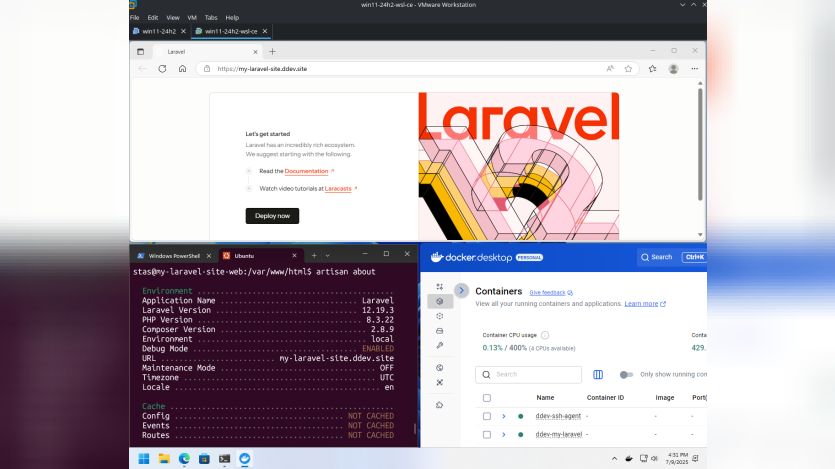
Stas Zhuk shows how to run DDEV inside VMware Workstation Pro virtual machines on both Windows 11 and Linux hosts. He highlights that VMware Workstation Pro is now free for personal use and that nested virtualization can sometimes fail depending on hardware and BIOS settings. Stas demonstrates initial VMware preferences, VM creation steps, and warns readers to look up workarounds if Intel VT-x/EPT or AMD-V/RVI virtualization flags do not enable.
The guide walks through the detailed configuration of a Windows 11 guest: choosing 100 GB disk storage, allocating 8 GB RAM and four virtual CPUs, enabling virtualization features, and applying advanced VMX settings via a shell script. He then covers registry tweaks to bypass TPM and secure boot checks, VMware Tools installation, disk cleanup and shrinking, snapshot management, and finally installing Docker and DDEV. For Linux guests, he describes installing open-vm-tools, fixing display resolution and shared folders, then proceeding with Docker and DDEV setup.
The post provides a thorough, step-by-step reference for developers needing isolated DDEV environments but may overwhelm readers new to VMware or nested virtualization. It lacks performance benchmarks for container startup times and a checklist of hardware compatibility. Adding troubleshooting tips for common errors and examples of CI integration would enhance its practical value. Overall, the instructions form a solid blueprint for reproducible local environments.
ASK: Drupal Community Needs Your Support
View all →
Disclosure: This content is produced with the assistance of AI.
Disclaimer: The opinions expressed in this story do not necessarily represent that of TheDropTimes. We regularly share third-party blog posts that feature Drupal in good faith. TDT recommends Reader's discretion while consuming such content, as the veracity/authenticity of the story depends on the blogger and their motives.
Note: The vision of this web portal is to help promote news and stories around the Drupal community and promote and celebrate the people and organizations in the community. We strive to create and distribute our content based on these content policy. If you see any omission/variation on this please reach out to us at #thedroptimes channel on Drupal Slack and we will try to address the issue as best we can.

Related Organizations
Related People


You may also like